t3stedriv3
Membros
-
Registrou-se em
-
Última visita
-
 t3stedriv3 reacted to um post num tópico:
iMac reiniciou depois de mostrar tela branca indicando que houve um erro. Será que é problema de Hardware ou Software?
t3stedriv3 reacted to um post num tópico:
iMac reiniciou depois de mostrar tela branca indicando que houve um erro. Será que é problema de Hardware ou Software?
-
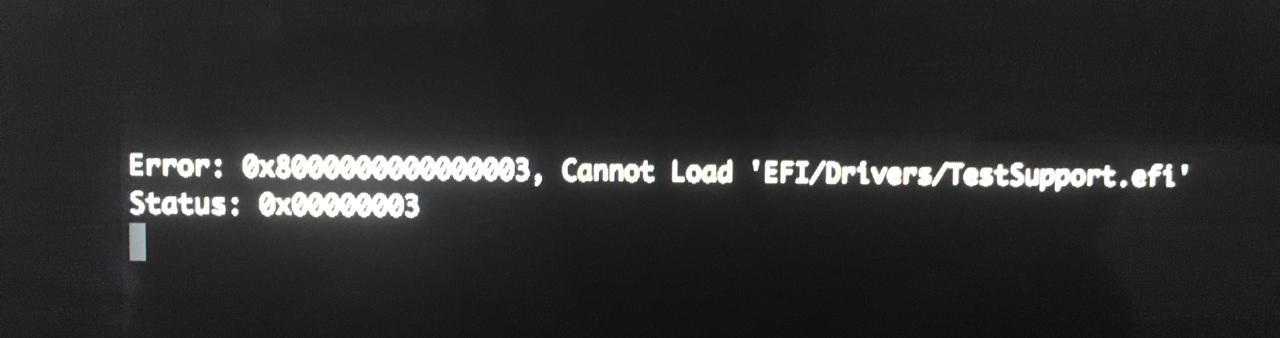
Oi, Beto! Obrigado pela resposta. Infelizmente a ferramenta de diagnóstico parou de funcionar depois de eu ter feito o upgrade para o Mojave. E pelo que vi, é um erro que vários iMac antigos possuem e não tem solução alguma. Quando eu tento, dá o erro que está anexado como imagem. Mais sobre o tópico aqui: https://github.com/upekkha/AppleHardwareTest Inclusive, eu tentei bootar o Hardware Test como é ensinado ali pelo pendrive, mas não obtive sucesso. Então a minha alternativa foi utilizar outras ferramentas como o Memtest86, DriveDx e EtreCheck. Memtest foram 4 horas de todos os testes bootado pelo pendrive. 0 erros. Vou deixar os relatórios do EtreCheck e DriveDx no rodapé, caso queira dar uma olhada. Mas pelo que vi, pode ser culpa do HD mesmo, por ter "Reallocated Sector Count" no valor de 35 e também por ser um HD velho. Mas esse valor 35 não mudou, porque eu fiz esse teste em novembro do ano passado. Então eu estou torcendo para o velhinho HD aguente até a pandemia acabar pelo menos. Falando nisso, eu criei um tópico referente a troca de HD aqui. Você tem noção de quanto uma assistência autorizada iria cobrar para trocar um HD velho de 1TB para um novo de 1TB ou 2 no modelo iMac (21.5-inch, Late 2012)? Eu sei que o processo pode ser demorado e complicado, por ser uma tela colada. E ouvi dizer que eles cobram um valor absurdo antes, por garantia de ocorrer algo de errado na retirada da tela. Obrigado! Relatório DriveDx: ### SYSTEM INFORMATION ### Report Timestamp : 27 de março de 2021 14:43:24 BRT Report Timestamp (ISO 8601 format) : 2021-03-27T14:43:24 Application Name : DriveDx Application Version : 1.8.2.610 Application SubBuild : 1 Application Edition : Standalone Application Website : https://binaryfruit.com/drivedx DriveDx Knowledge Base Revision : 9/9 Computer Name : iMac de Newto Host Name : iMac-de-Newto Computer Model : iMac13,1 OS Boot Time : 2021-03-27T13:44:13 Time Since Boot : 00h 59m 11s OS Name : macOS OS Version : 10.14.6 OS Build : 18G103 OS Kernel Version : Darwin 18.7.0 SAT SMART Driver Version : N/A ATA Command Support Tolerance : verypermissive N of drives with S.M.A.R.T support : 1 ### DRIVE 1 OF 1 ### Last Checked : 27 de março de 2021 14:42:44 BRT Last Checked (ISO 8601 format) : 2021-03-27T14:42:44 Advanced SMART Status : FAILING Overall Health Rating : N/A 85.6% Overall Performance Rating : GOOD 85.6% Issues found : 1 Serial Number : J880007KJJPT5A WWN Id : 5 000cca 6c6e3c6b4 Volumes : Macintosh HD Device Path : /dev/disk0 Total Capacity : 1.0 TB (1.000.204.886.016 Bytes) Model : APPLE HDD HTS541010A9E662 Form Factor : 2.5 inches Firmware Version : JA0AB560 Drive Type : HDD 5400 rpm Power On Time : 26.348 hours (36 months 17 days 20 hours) Power Cycles Count : 7.097 Current Power Cycle Time : 1.0 hours === DEVICE CAPABILITIES === S.M.A.R.T. support enabled : yes DriveDx Active Diagnostic Config : Base config [hdd.default] Sector Logical Size : 512 Sector Physical Size : 4096 Physical Interconnect : SATA Logical Protocol : SATA Removable : no Ejectable : no ATA Version : ATA8-ACS T13/1699-D revision 6 SATA Version : SATA 2.6, 3.0 Gb/s (current: 3.0 Gb/s) Bay # : 1 I/O Path : IOService:/AppleACPIPlatformExpert/PCI0@0/AppleACPIPCI/SATA@1F,2/AppleIntelPchSeriesAHCI/PRT0@0/IOAHCIDevice@0/AppleAHCIDiskDriver/IOAHCIBlockStorageDevice Attributes Data Structure Revision : 16 SMART Command Transport (SCT) flags : 0x3d SCT Status supported : yes SCT Feature Control supported : yes SCT Data Table supported : yes Error logging capabilities : 0x1 Self-tests supported : yes Offline Data Collection capabilities : 0x5b Offline Data Collection status : 0x0 Auto Offline Data Collection flags : 0x0 [Known device ]: no [Drive State Flags ]: 0x2000000 [Last State Change Timestamp ]: 2021-03-27T14:39:15 [Last State Change Flags ]: 0x2000000 [Last State Change Diff Flags ]: 0x1 Last Email Report Timestamp : 2021-03-27T14:39:15 Last Email Report Reason Flags : 0x2000000 Last Email Report State Change Flags : 0x1 === CURRENT POWER CYCLE STATISTICS === Data Read : 7.5 GB Data Written : 4.0 GB Data Read/Write Ratio : 1.88 Average Throughput (Read) : 2.7 MB/s Average Throughput (Write) : 5.2 MB/s Operations (Read) : 427.784 Operations (Write) : 113.761 Operations Read/Write Ratio : 4 Throughput per operation (Read) : 18.3 KB/Op Throughput per operation (Write) : 36.6 KB/Op Latency Time (Read) : 0 ns Latency Time (Write) : 0 ns Retries (Read) : 0 Retries (Write) : 0 Errors (Read) : 0 Errors (Write) : 0 === PROBLEMS SUMMARY === Failed Indicators (life-span / pre-fail) : 0 (0 / 0) Failing Indicators (life-span / pre-fail) : 1 (0 / 1) Warnings (life-span / pre-fail) : 0 (0 / 0) Recently failed Self-tests (Short / Full) : 0 (0 / 0) I/O Error Count : 0 (0 / 0) Time in Under temperature : 0 minutes Time in Over temperature : 0 minutes === IMPORTANT HEALTH INDICATORS === ID NAME RAW VALUE STATUS 5 Reallocated Sector Count 35 100% Failing 197 Current Pending Sector Count 0 100% OK 198 Offline Uncorrectable Sector Count 0 100% OK 199 UDMA CRC Error Count 0 100% OK === TEMPERATURE INFORMATION (CELSIUS) === Current Temperature : 50 Power Cycle Min Temperature : 49 Power Cycle Max Temperature : 52 Lifetime Min Temperature : 8 Lifetime Max Temperature : 55 Recommended Min Temperature : 0 Recommended Max Temperature : 60 Temperature Min Limit : -40 Temperature Max Limit : 65 === DRIVE HEALTH INDICATORS === ID | NAME | TYPE | UPDATE | RAW VALUE | VALUE | THRESHOLD | WORST | LAST MODIFIED | STATUS 1 Raw Read Error Rate Pre-fail online 0x0 100 62 100 - 100% OK 2 Throughput Performance Pre-fail offline 0 100 40 100 - 100% OK 3 Spin Up Time Pre-fail online 1 176 33 176 - 85.6% OK 4 Start Stop Count Life-span online 7.097 96 0 96 - 96.0% OK 5 Reallocated Sector Count Pre-fail online 35 100 5 100 - 100% Failing 7 Seek Error Rate Pre-fail online 0x0 100 67 100 - 100% OK 8 Seek Time Performance Pre-fail offline 0 100 40 100 - 100% OK 9 Power On Hours Life-span online 26.348 40 0 40 - 40.0% OK 10 Spin Retry Count Pre-fail online 0 100 60 100 - 100% OK 12 Power Cycle Count Life-span online 7.097 96 0 96 - 96.0% OK 160 Vendor Specific Life-span online 0x0 100 0 100 - 100% OK 191 G-Sense Error Rate Life-span online 0 100 0 100 - 100% OK 192 Power-Off Retract Count Life-span online 0x10000007B 100 0 100 - 100% OK 193 Load Cycle Count Life-span online 675.076 33 0 33 - 33.0% OK 194 Temperature (Celsius) Life-span online 50 120 0 120 - 60.0% OK 195 Hardware ECC Recovered Life-span online 0x0 100 0 100 - 100% OK 196 Reallocated Event Count Life-span online 35 100 0 100 - 100% OK 197 Current Pending Sector Count Life-span online 0 100 0 100 - 100% OK 198 Offline Uncorrectable Sector Count Life-span offline 0 100 0 100 - 100% OK 199 UDMA CRC Error Count Life-span online 0 200 0 200 - 100% OK 223 Load Retry Count Life-span online 0 100 0 100 - 100% OK 254 Free Fall Sensor Life-span online 22 100 0 100 - 100% OK === DRIVE ERROR LOG === error log is empty === DRIVE SELF-TEST LOG === # | LIFETIME (H) | TEST TYPE | PROGRESS | STATUS | LBA of 1st error 1 26348 Short offline 100% Completed without error - 2 24925 Short offline 100% Completed without error - 3 21500 Short offline 100% Completed without error - Relatório EtreCheck: EtreCheck version: 6.2.3 (6C010) Report generated: 2021-03-27 13:55:52 Download EtreCheckPro from https://etrecheck.com Runtime: 4:26 Performance: Good Problem: Computer is restarting Major Issues: Anything that appears on this list needs immediate attention. No Time Machine backup - Time Machine backup not found. Automatic updates disabled - Automatic updates are disabled. This computer is at risk of malware infection. Security updates disabled - Security updates are disabled. This computer is at risk of malware infection. Kernel panics - This system has experienced kernel panics that could be related to 3rd party software. Apple security disabled - Apple security software is disabled. This computer is at risk of malware infection. Minor Issues: These issues do not need immediate attention but they may indicate future problems or opportunities for improvement. Apps with heavy CPU usage - There have been numerous cases of apps with heavy CPU usage. Unsigned files - There are unsigned software files installed. Apple has said that unsigned software will not run by default in a future version of the operating system. 32-bit Apps - This machine has 32-bits apps will not work on macOS 10.15 "Catalina". Kernel extensions present - This machine has kernel extensions that may not work in the future. Hardware Information: iMac (21.5-inch, Late 2012) iMac Model: iMac13,1 1 2,7 GHz Intel Core i5 (i5-3330S) CPU: 4-core 8 GB RAM - Upgradeable by an Apple Authorized Service Provider BANK 0/DIMM0 - 4 GB DDR3 1600 BANK 1/DIMM0 - 4 GB DDR3 1600 Video Information: NVIDIA GeForce GT 640M - VRAM: 512 MB iMac 1920 x 1080 Drives: disk0 - APPLE HDD HTS541010A9E662 1.00 TB (Mechanical - 5400 RPM) Internal SATA 3 Gigabit Serial ATA disk0s1 - EFI (MS-DOS FAT32) [EFI] 210 MB disk0s2 [APFS Container] 1000.00 GB disk1 [APFS Virtual drive] 1000.00 GB (Shared by 4 volumes) disk1s1 - Macintosh HD (APFS) (Shared - 707.79 GB used) disk1s2 - Preboot (APFS) [APFS Preboot] (Shared - 26 MB used) disk1s3 - Recovery (APFS) [Recovery] (Shared - 507 MB used) disk1s4 - VM (APFS) [APFS VM] (Shared - 4.29 GB used) Mounted Volumes: disk1s1 - Macintosh HD 1000.00 GB (Shared - 707.79 GB used, 292.29 GB available, 287.17 GB free) APFS Mount point: / disk1s4 - VM [APFS VM] 1000.00 GB (Shared - 4.29 GB used, 287.17 GB free) APFS Mount point: /private/var/vm disk2s2 - E**********o 36 MB (24 MB used, 12 MB free) Mac OS Extended Disk Image Mount point: /Volumes/E**********o Owners enabled: No Read-only: Yes Network: Interface en0: Ethernet Interface en5: iPhone Interface en1: Wi-Fi Interface en4: Bluetooth PAN Interface bridge0: Thunderbolt Bridge iCloud Quota: 4.73 GB available System Software: macOS Mojave 10.14.6 (18G103) Time since boot: Less than an hour Security: Gatekeeper: App Store and identified developers System Integrity Protection: Enabled Automatic Updates: Disabled Security Updates: Disabled Antivirus software: None! Unsigned Files: Running app: /Applications/EtreCheckPro.app/Contents/MacOS/EtreCheckPro Apps: 6 32-bit Applications: 2 32-bit apps Kernel Extensions: /Library/Application Support/org.pqrs/Karabiner-VirtualHIDDevice/Extensions [Loaded] org.pqrs.driver.Karabiner.VirtualHIDDevice.v061000.kext (Fumihiko Takayama, 6.10.0 - SDK 10.12) System Launch Agents: [Not Loaded] 16 Apple tasks [Loaded] 174 Apple tasks [Running] 110 Apple tasks System Launch Daemons: [Not Loaded] 38 Apple tasks [Loaded] 180 Apple tasks [Running] 116 Apple tasks Launch Agents: [Not Loaded] com.adobe.AdobeCreativeCloud.plist (Adobe Inc. - installed 2020-11-15) [Running] com.adobe.GC.AGM.plist (Adobe Systems, Inc. - installed 2020-11-15) [Not Loaded] com.adobe.GC.Invoker-1.0.plist (Adobe Systems, Inc. - installed 2020-11-15) [Loaded] com.adobe.ccxprocess.plist (Apple - installed 2020-11-15) [Running] org.pqrs.karabiner.agent.karabiner_grabber.plist (Fumihiko Takayama - installed 2020-06-27) [Running] org.pqrs.karabiner.agent.karabiner_observer.plist (Fumihiko Takayama - installed 2020-06-27) [Running] org.pqrs.karabiner.karabiner_console_user_server.plist (Fumihiko Takayama - installed 2020-06-27) [Running] org.pqrs.karabiner.karabiner_session_monitor.plist (Fumihiko Takayama - installed 2020-06-27) Launch Daemons: [Loaded] com.adobe.acc.installer.v2.plist (Adobe Inc. - installed 2021-02-24) [Running] com.adobe.agsservice.plist (Adobe Systems, Inc. - installed 2020-11-15) [Running] org.pqrs.karabiner.karabiner_grabber.plist (Fumihiko Takayama - installed 2020-06-27) [Running] org.pqrs.karabiner.karabiner_kextd.plist (Fumihiko Takayama - installed 2020-06-27) [Running] org.pqrs.karabiner.karabiner_observer.plist (Fumihiko Takayama - installed 2020-06-27) User Launch Agents: [Not Loaded] com.adobe.GC.Invoker-1.0.plist (Adobe Systems, Inc. - installed 2020-11-15) [Loaded] com.google.keystone.agent.plist (Google, Inc. - installed 2021-03-04) [Loaded] com.google.keystone.xpcservice.plist (Google, Inc. - installed 2021-03-04) User Login Items: [Not Loaded] AppCleaner SmartDelete (Julien Ramseier - installed 2021-03-14) Modern Login Item /Applications/AppCleaner.app/Contents/Library/LoginItems/AppCleaner SmartDelete.app Audio Plug-ins: AppleTimeSyncAudioClock: 1.0 (Apple - installed 2019-09-20) BluetoothAudioPlugIn: 6.0.14 (Apple - installed 2019-09-20) AirPlay: 2.0 (Apple - installed 2019-09-20) AppleAVBAudio: 760.6 (Apple - installed 2019-09-20) BridgeAudioSP: 5.52 (Apple - installed 2019-09-20) iSightAudio: 7.7.3 (Apple - installed 2019-09-20) Time Machine: Time Machine Not Configured! Performance: System Load: 2.01 (1 min ago) 1.81 (5 min ago) 0.96 (15 min ago) Nominal I/O speed: 6.96 MB/s File system: 26.92 seconds Write speed: 83 MB/s Read speed: 72 MB/s CPU Usage Snapshot: Type Overall System: 11 % User: 3 % Idle: 86 % Top Processes Snapshot by CPU: Process (count) CPU (Source - Location) system_profiler (2) 50.20 % (Apple) trustd (3) 11.26 % (Apple) mds_stores 6.52 % (Apple) WindowServer 5.12 % (Apple) EtreCheckPro 3.92 % (? - /Applications/EtreCheckPro.app) Top Processes Snapshot by Memory: Process (count) RAM usage (Source - Location) Google Chrome Helper (Renderer) (14) 1.37 GB (Google, Inc.) EtreCheckPro 453 MB (? - /Applications/EtreCheckPro.app) system_profiler (2) 398 MB (Apple) mdworker_shared (18) 349 MB (Apple) Google Chrome 196 MB (Google, Inc.) Top Processes Snapshot by Network Use: Process Input / Output (Source - Location) mDNSResponder 85 KB / 42 KB (Apple) apsd 7 KB / 10 KB (Apple) cloudd 7 KB / 2 KB (Apple) fmfd 2 KB / 3 KB (Apple) rapportd 1 KB / 1 KB (Apple) Top Processes Snapshot by Energy Use: Process (count) Energy (0-100) (Source - Location) warmd 18 (Apple) WindowServer 3 (Apple) Google Chrome Helper (Renderer) (14) 0 (Google, Inc.) Adobe Creative Cloud 0 (? - /Applications/Utilities) accountsd 0 (Apple) Virtual Memory Information: Physical RAM: 8 GB Free RAM: 430 MB Used RAM: 4.46 GB Cached files: 3.12 GB Available RAM: 3.54 GB Swap Used: 0 B Diagnostics Information (past 7-30 days): 2021-03-27 11:34:18 Cinema 4D.app - High CPU Use (2 times) Executable: /Applications/Maxon Cinema 4D R21/Cinema 4D.app 2021-03-27 11:14:49 Kernel Panic Details: panic(cpu 1 caller 0xffffff7f90a23d32): "Did you forget to call contex tStop when contextStart failed?"@/BuildRoot/Library/Caches/com.apple.x bs/Sources/IOAcceleratorFamily_kexts/IOAcceleratorFamily-404.14/Kext2/ IOGraphicsAccelerator.cpp:1862 3rd party kernel extensions: org.pqrs.driver.Karabiner.VirtualHIDDevice.v061000 2021-03-26 13:10:37 signpost_reporter - High CPU Use (5 times) Executable: /usr/libexec/signpost_reporter 2021-03-22 13:21:06 VLC.app - High CPU Use Executable: /Applications/VLC.app End of report
-
Boa tarde, pessoal. Vocês poderiam me dizer qual seria a melhor assistência técnica no paraná? Pode ser fora de Curitiba também, caso alguém tenha tido experiência boa. Outra coisa, alguém tem noção de quanto eles iriam cobrar para trocar um HD velho de 1TB para um novo de 1TB ou 2 no modelo iMac (21.5-inch, Late 2012)? Pelo o que eu li, assistência técnica pode demorar de 15/30 dias pra retornar fazendo esse processo(ainda mais no meio da pandemia) Outra coisa que ouvi falar, é que eles cobram um valor absurdo antes caso ocorra problema em retirar a tela que é colada, isso é real? Desde já, obrigado!
-
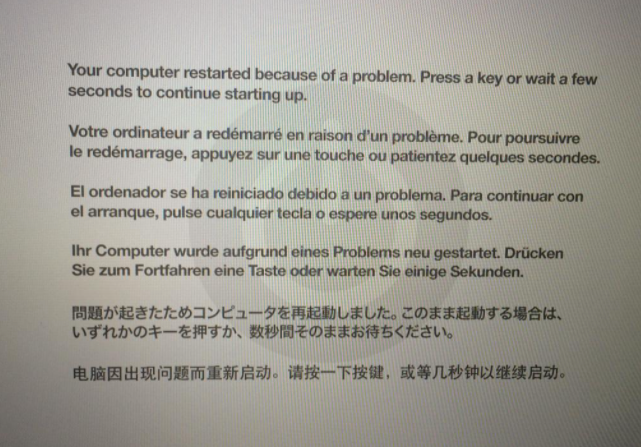
Boa tarde! Hoje de manhã meu iMac de 2012 utilizando o macosx Mojave reiniciou depois de mostrar a tela anexada. Depois de reiniciar normalmente, me deu o relatório do que poderia ter acontecido. Será que algum problem de CPU ou é conflito do sistema/software mesmo? Segue: -------------------- *** Panic Report *** panic(cpu 1 caller 0xffffff7f90a23d32): "Did you forget to call contextStop when contextStart failed?"@/BuildRoot/Library/Caches/com.apple.xbs/Sources/IOAcceleratorFamily_kexts/IOAcceleratorFamily-404.14/Kext2/IOGraphicsAccelerator.cpp:1862 Backtrace (CPU 1), Frame : Return Address 0xffffff911eca3940 : 0xffffff800f9ae6ed 0xffffff911eca3990 : 0xffffff800faea185 0xffffff911eca39d0 : 0xffffff800fadb8ba 0xffffff911eca3a40 : 0xffffff800f95bb40 0xffffff911eca3a60 : 0xffffff800f9ae107 0xffffff911eca3b80 : 0xffffff800f9adf53 0xffffff911eca3bf0 : 0xffffff7f90a23d32 0xffffff911eca3c80 : 0xffffff8010029950 0xffffff911eca3cd0 : 0xffffff801008e89a 0xffffff911eca3d30 : 0xffffff800fa96052 0xffffff911eca3d80 : 0xffffff800f9b3f2c 0xffffff911eca3dd0 : 0xffffff800f98eca1 0xffffff911eca3e50 : 0xffffff800f9a33be 0xffffff911eca3ef0 : 0xffffff800fac17e7 0xffffff911eca3fa0 : 0xffffff800f95c326 Kernel Extensions in backtrace: com.apple.iokit.IOAcceleratorFamily2(404.14)[618B24B5-1387-31FD-A7F7-53283E2C3FEA]@0xffffff7f909f2000->0xffffff7f90a98fff dependency: com.apple.driver.AppleMobileFileIntegrity(1.0.5)[1D716047-7F62-3FFA-8C01-26C166B3739A]@0xffffff7f909aa000 dependency: com.apple.iokit.IOSurface(255.6.1)[263BDC28-38C8-3995-BB6B-AD419E41C2DC]@0xffffff7f909c7000 dependency: com.apple.iokit.IOPCIFamily(2.9)[BFDEB8D4-50FE-3DDB-87B7-F6A504393830]@0xffffff7f90295000 dependency: com.apple.iokit.IOGraphicsFamily(530.66)[373EAB85-2C5F-3B84-B86D-421F79C47DF2]@0xffffff7f90583000 dependency: com.apple.iokit.IOReportFamily(47)[0BC9F93B-456A-3D97-BE4C-69DCBB5E8A3C]@0xffffff7f909eb000 BSD process name corresponding to current thread: WindowServer Mac OS version: 18G103 Kernel version: Darwin Kernel Version 18.7.0: Tue Aug 20 16:57:14 PDT 2019; root:xnu-4903.271.2~2/RELEASE_X86_64 Kernel UUID: C41337A1-0EC3-3896-A954-A1F85E849D53 Kernel slide: 0x000000000f600000 Kernel text base: 0xffffff800f800000 __HIB text base: 0xffffff800f700000 System model name: iMac13,1 (Mac-00BE6ED71E35EB86) System uptime in nanoseconds: 74575938212 last loaded kext at 74210162038: com.apple.driver.AppleBluetoothHIDKeyboard 208 (addr 0xffffff7f93f60000, size 12288) last unloaded kext at 61323473775: com.apple.driver.AppleUSBMergeNub 900.4.2 (addr 0xffffff7f926e0000, size 12288) ---- Desde já, obrigado!